Guide
How to prepare a CSV for barcode labels
Preserve identifier text, define columns, preview mapping and protect spreadsheet exports before generating a label sheet.
On this page
Direct answer
Prepare a small, explicit table with one header row and one row per label. Store barcode values as text, preserve leading zeros, keep title and subtitle fields separate, and choose one delimiter consistently. Preview the file and map columns before generating anything.
Do not treat CSV as a trustworthy database export. It is a text interchange format with implementation differences. Validate file size, row count, encoding, headers, field boundaries and formula-like cells before using it in a spreadsheet or label workflow.
Recommended columns
A practical file might contain columns named barcode_value, symbology, title, subtitle and footer. Only include fields the label template uses. Avoid hidden business logic in overloaded columns, such as putting a type name and identifier in the same cell.
Use stable machine-oriented headers without spaces if several systems exchange the file. Document whether symbology values are required or whether one selected type applies to every row. Make empty optional fields truly empty rather than filling them with words such as none that could print accidentally.
Keep the source filename separate from label data. Uploaded filenames can reveal customer or project information and should not enter analytics, public URLs or generated report names.
Preserve identifiers as text
Spreadsheet programs often interpret digit strings as numbers, remove leading zeros or display long values in scientific notation. Set the column to text before importing or use an import wizard that lets you choose the type. Verify the character count after import and again after export.
Do not repair a shortened value by guessing how many zeros were removed. Return to the source system. In code, parse the CSV field as a string and never call numeric conversion for identifiers.
Dates deserve the same care. A GS1 compact date field is data with a specific format, not a spreadsheet date to be reformatted according to locale.
Worked example
Create a test file with a header row and three synthetic records: one with all display fields, one with only a value and title, and one designed to exercise the longest allowed text. Import it locally, select the correct value and display mappings, choose the media and inspect every page of the preview.
Confirm that the leading zero remains visible, long text produces an explicit overflow warning and empty optional fields do not leave stray punctuation. Export a test PDF or SVG and print a calibration sheet before using production stock.
TEST / SYNTHETIC / NOT FOR COMMERCIAL USE. Test rows must not be sent into live catalogue, inventory, shipment or marketplace systems.
Quoting, delimiters and encoding
RFC 4180 documents a common CSV format in which records are separated by line breaks, fields are comma-separated, and fields containing commas, quotes or line breaks are enclosed in double quotes. Embedded double quotes are represented by doubling them. Real software varies, so a preview is essential.
BarcodeOpsKit also accepts tab-separated input in supported workflows. Detecting a delimiter does not prove the file is safe or correctly mapped. Reject inconsistent rows and show the operator which columns were found.
Use UTF-8 for predictable text exchange. Byte-order marks and legacy encodings can change header matching or display text. Keep file and row limits visible before selection so a large file is rejected before consuming excessive memory.
Spreadsheet formula risk
Cells beginning with characters such as =, +, - or @ may be interpreted as formulas by spreadsheet applications. OWASP documents this as CSV Injection or Formula Injection. Export code should neutralize risky prefixes according to the intended spreadsheet workflow and quote fields correctly.
No single mitigation behaves identically in every spreadsheet and later re-save workflow. Treat exports containing untrusted text as data, warn users not to enable unexpected formulas and keep a raw machine exchange format separate when appropriate.
Common mistakes
- Formatting identifier columns as numbers.
- Using duplicate or blank headers.
- Mixing commas and tabs without an explicit preview.
- Mapping the display title as the barcode value.
- Allowing one row to select an unsupported symbology silently.
- Ignoring formula-like text in exported spreadsheet cells.
- Printing the entire batch before checking overflow and calibration.
Limits and what is not checked
Local CSV parsing does not establish that identifiers are issued, owned or linked to the described products. A fitting label layout does not certify physical print quality or retailer acceptance. BarcodeOpsKit does not upload the file, but browser, hosting and AdSense operational providers may process connection metadata on eligible public pages as described in the privacy policy.
The tool enforces bounded input and mapping rules; it is not an inventory or product-information system and does not persist raw CSV automatically.
Use the related tool
Use the label sheet generator to choose a local CSV or TSV, preview detected columns, map fields, review page geometry and export. Use the bulk validator first when you need row-level structural results and a safe error export.
Sources and review
This guide was reviewed on 2026-07-13 against RFC 4180 and OWASP’s CSV Injection guidance. The sources describe common format and security boundaries; they do not dictate every spreadsheet product’s behavior. Test the exact applications in your workflow.
Related guides
Read SVG vs PNG for barcode printing for export choices and GTIN-8, GTIN-12, GTIN-13 and GTIN-14 explained for leading-zero handling.
Preview and map columns before label generation
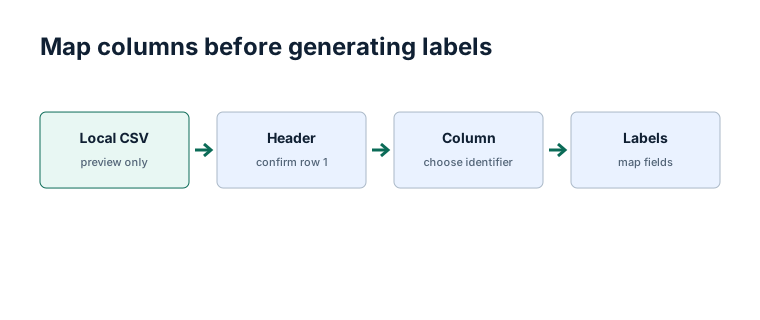
Original workflow aid
CSV preflight table
Review structure and preservation before mapping rows into labels; a clean preview is evidence, not a substitute for source validation.
Related local tool
Continue with the working tool
Map a CSV into a local label sheetSource record
- Common Format and MIME Type for CSV Files, RFC Editor. Version or revision: RFC 4180. Reviewed .
- CSV Injection, OWASP Foundation. Version or revision: Reviewed 2026-07-13. Reviewed .