Local browser tool
Bulk barcode validator
Preview and validate one identifier column from pasted lines, CSV, or TSV without uploading the source file.
Step 1 · Source
Add identifiers
Files are parsed locally in your browser. Their contents are not uploaded to BarcodeOpsKit.
CSV or TSV text · 10 MB maximum · 10,000 rows on this layout
One identifier per line also works. The first five data rows appear in preview before processing.
TEST / SYNTHETIC / NOT FOR COMMERCIAL USE applies to the built-in sample.
Local batch validation pipeline
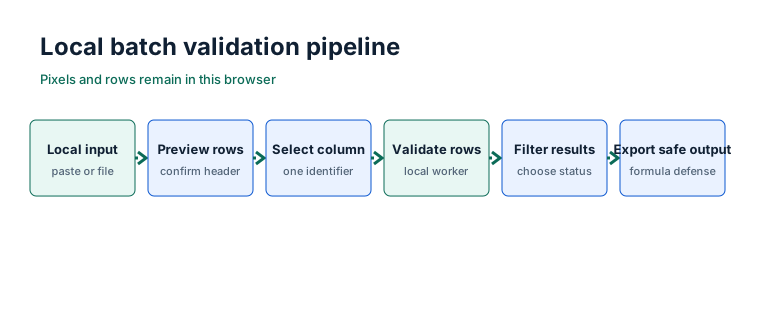
How bulk validation works
The browser worker parses delimited text, lets you confirm whether the first row is a header, and validates only the column you select. Each non-empty cell passes through the same deterministic identifier engine used by the single-value validator. The original cell and normalized value remain separate so removed spaces or dash separators are visible.
- Add a CSV/TSV file or paste one identifier per line.
- Review the first five data rows and choose the identifier column.
- Run the local worker, filter evidence, and explicitly download the outputs you need.
Limits and result counts
Files and pasted text are limited to 10 MB. The desktop layout accepts at most 10,000 data rows; the narrow mobile layout accepts 2,000. Known unsupported files and over-limit jobs are rejected before validation begins. Split a larger source into smaller CSV or TSV files.
Valid, warning, and failed are exclusive status totals. Duplicate, unknown, and empty are diagnostics that may overlap a status. For example, two mathematically valid repeated values are both reported as duplicate warnings.
What is not checked
A valid row means its characters, supported length, and final digit satisfy the local structural rules. It does not establish GS1 issuance, registry ownership, company identity, product identity, physical print quality, symbol certification, or retailer acceptance. BarcodeOpsKit is not affiliated with GS1.
Worked batch example
A two-column file with headers item,barcode can map the second column for validation. A repeated 95200002 is marked duplicate,95200003 reports an expected final digit of2, and a blank cell remains an explicit empty failure rather than disappearing from the row count.
TEST / SYNTHETIC / NOT FOR COMMERCIAL USE. The built-in sample explains result states and does not claim assignment or ownership.
Common import problems
- A spreadsheet removed leading zeros
- Export the source column as text before loading it. BarcodeOpsKit preserves zeros that are present, but cannot reconstruct ones already removed.
- A quoted value is unfinished
- The parse error reports the line and column where the quote started. Correct the source and create a new preview.
- The wrong column was detected
- Use the identifier-column selector. Header detection is a preview aid, not an irreversible decision.
- The job exceeds the active limit
- Split it before processing. The tool never starts a known over-limit job.
Safe local exports
Result CSV files retain identifier strings and their leading zeros. Cells beginning with spreadsheet formula markers are prefixed safely before CSV quoting. Summary JSON and the plain-text report contain counts and validation scope only; they do not include source identifiers. Download names are sanitized and temporary browser object URLs are revoked.
Privacy and local processing
Source text is read into the active page and parsed in a dedicated browser worker. Rows, file contents, and identifiers are not placed in URLs, analytics events, console logs, persistent storage, or server requests. Cancellation terminates the worker and discards partial results. Hosting, security, consent, and advertising systems may still process ordinary operational data unrelated to tool input.
Sources and review
Identifier logic reviewed 2026-07-13 against GS1 General Specifications 26.0.0 (January 2026), official GS1 identifier-key descriptions, and theGS1 check digit explanation. CSV safety follows the repository policy of neutralizing spreadsheet formula prefixes at export.
Related tools
Inspect one row in more detail with thesingle identifier validatoror calculate a missing final digit with theGTIN check digit calculator. Before importing a spreadsheet export, reviewhow to prepare a safe barcode CSV.