Guide
GS1 Application Identifiers: how field meaning is declared
Read AI prefixes as data definitions, distinguish fixed and variable fields and keep syntax evidence separate from ownership claims.
On this page
Direct answer
A GS1 Application Identifier, usually shortened to AI, is a numeric prefix that declares what the following data field means and what syntax applies. For example, one AI can identify a GTIN field while another identifies a batch or lot, date, serial number, measurement or location-related value. The AI is part of the encoded element string; display parentheses are not.
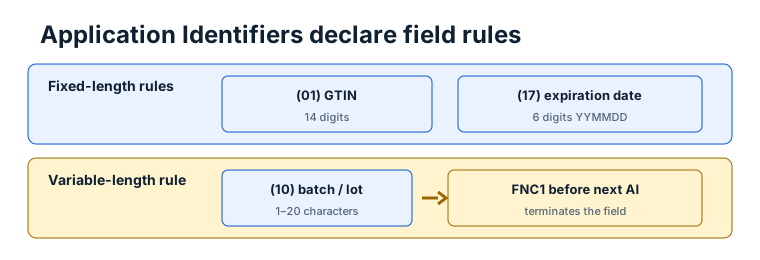
Parsing an AI is deterministic only when field boundaries are available. Fixed-length definitions end after the prescribed number of characters. Variable-length definitions need a separator when another element follows, unless the field is last.
Reading an element string
Human-readable notation commonly shows (01) before a GTIN or (10) before a batch/lot value. Parentheses make the definition visible to people, but a barcode encoder normally receives the AI digits and data under carrier-specific rules. A parser may accept bracketed notation as an input convenience while clearly displaying the normalized scanner form.
An AI definition can specify numeric or broader character sets, exact or maximum length, title, check-digit or date rules, and relationships to other AIs. A complete implementation uses a reviewed dictionary snapshot rather than a small handwritten list scattered through UI components.
BarcodeOpsKit vendors the official GS1 Syntax Dictionary release dated 2026-01-27 and generates a local runtime dictionary. The tool performs no mutable standards fetch while the user is parsing data.
Worked example
Take a fictional bracketed element string containing an AI for a GTIN, followed by an AI for an expiration date and an AI for a batch. The parser can identify the declared fields, apply fixed boundaries to the GTIN and date, and allow the batch to run to the end when it is last.
If the batch appears before another element, the scanner form needs an unambiguous separator after the variable-length batch. Without it, digits that resemble a following AI may simply be part of the batch. A conservative parser reports ambiguity instead of selecting a convenient split.
TEST / SYNTHETIC / NOT FOR COMMERCIAL USE. The described fields are parser examples and do not identify an issued trade item or production batch.
Fixed, variable and related fields
Fixed-length fields help a parser advance by a known number of characters. Variable fields define a maximum, not a promise that every value fills that maximum. The separator tells the parser where a shorter value ends when more data follows.
Some definitions require or exclude combinations. A syntax dictionary can expose these relationships, but passing them still does not prove the business record is true. A structurally valid date can refer to the wrong product; a valid batch string can be fictional; a GTIN can have a matching digit without being allocated.
Dates also need explicit interpretation. GS1 date fields use defined compact forms, and an implementation should distinguish syntactic date validation from timezone, recall, shelf-life or inventory policy.
Common mistakes
- Encoding the visible parentheses as ordinary data.
- Assuming every AI has two digits; AI lengths vary.
- Splitting a variable field by guessing where another AI-like sequence begins.
- Omitting FNC1 or ASCII 29 when another field follows variable data.
- Treating an unassigned AI as private data without an agreed rule.
- Calling a parsed field “verified” when only syntax was checked.
- Using a stale online summary instead of a versioned official dictionary.
Limits and what is not checked
The parser checks supported dictionary syntax, characters, lengths, separators and implemented field rules. It does not issue identifiers, confirm company prefixes, query registration, verify product or batch truth, test a resolver, validate regulated-industry obligations or certify a barcode.
Carrier correctness is a separate layer. An element string can parse while a printed symbol has inadequate dimensions or contrast. A readable image can also contain semantically false data. Operational decisions need source records and application-specific review.
Use the related tool
Paste bracketed or scanner-form data into the GS1 Application Identifier parser. It shows each AI, title, value, format, separator evidence and issues, plus the exact standards snapshot. It does not auto-open URLs or send values to a server.
Sources and review
This guide was reviewed on 2026-07-13 against GS1 Syntax Dictionary 2026-01-27 and GS1 General Specifications 26.0.0. The vendored snapshot records source, hash, retrieval, review and licence metadata. BarcodeOpsKit is independent from GS1.
Related guides
Read FNC1 separators explained for boundary details and Code 128 vs GS1-128 for the carrier rules surrounding the element string.
Application Identifiers declare each field
Original workflow aid
AI parsing responsibilities
An AI definition supplies syntax constraints, while truth, allocation and physical carrier quality remain separate checks.
Related local tool
Continue with the working tool
Parse a GS1 element string locallySource record
- GS1 Syntax Dictionary, GS1. Version or revision: 2026-01-27. Reviewed .
- GS1 General Specifications, GS1. Version or revision: 26.0.0. Reviewed .