Guide
How GS1 check digits work
Follow the Modulo-10 weighting method used by GTIN, GLN and SSCC and learn what a matching final digit proves.
On this page
Direct answer
The GS1 check digit is calculated with a Modulo-10 method. Starting at the rightmost digit of the body, multiply alternating positions by 3 and 1, add the products, and choose the final digit that brings the total up to the next multiple of ten. If the sum already ends in zero, the check digit is zero.
The same calculation pattern is used for the supported GTIN, GLN and SSCC forms, but the body length differs. The safest workflow is to keep the body as a string, confirm the intended key type and length, and show every weighted position rather than relying on an opaque result.
How the weighting works
The final check digit is excluded while calculating. Read the remaining body from right to left. The nearest body digit receives weight 3, the next receives weight 1, and the pattern repeats. The direction is important: beginning the pattern from the left can produce the wrong result when the body length changes.
After multiplication, add every product. Let the sum be S. The check digit can be expressed as (10 - (S mod 10)) mod 10. The outer modulo handles the case where the remainder is zero, returning zero rather than ten.
BarcodeOpsKit displays the original position, digit, weight and product so an operator can reproduce the calculation. It does not convert the body to a JavaScript number, because doing so would discard leading zeros and can exceed safe integer behavior for long identifiers.
Worked example
Use a fictional short body to understand the arithmetic, not to create a commercial identifier. Read its digits from the right, apply 3, 1, 3, 1 and continue until every position has a product. If those products total 67, the next multiple of ten is 70, so the check digit is 3. Appending 3 makes the full weighted total divisible by ten.
For a full-number validation, separate the final character first. Calculate the expected digit from the preceding body, then compare the expected and entered digits. Do not recalculate across the already complete number while also treating the last character as new data.
TEST / SYNTHETIC / NOT FOR COMMERCIAL USE. The arithmetic description is intentionally detached from an issued company prefix or trade item.
Body-only and full-number modes
Body-only mode answers, “What final digit should be appended?” For example, a GTIN-13 body has 12 digits and produces one final digit. Full-number mode answers, “Does the entered final digit match the body?” It keeps both values visible so an operator can locate a transcription error.
Do not guess the key type from a body when more than one interpretation is possible. A 12-digit string could be a complete GTIN-12 or the body of a GTIN-13. The calculator therefore asks the user to select a type or mode rather than silently choosing the convenient interpretation.
Common mistakes
- Including the entered check digit in the body calculation.
- Starting the alternating weights from the left instead of the right.
- Using weights 2 and 1 from a different identification system.
- Treating a leading zero as insignificant.
- Rounding or converting the body to a number.
- Assuming a matching digit repairs or authorizes the preceding digits.
- Replacing a mismatched digit without checking the source record.
When a digit does not match, return to the authoritative source. A mismatch may come from a mistyped body, an omitted leading zero, a wrong identifier type or a genuinely incorrect source value. Changing only the last digit can produce a structurally consistent but still incorrect identifier.
Limits and what is not checked
A check digit catches many common substitutions and transcription errors, but it is not a cryptographic signature and cannot detect every possible change. A matching digit does not prove that GS1 issued the number, that a company owns it, that a product record exists, or that the value is accepted by a retailer.
The calculation also says nothing about barcode image geometry, quiet zones, contrast, printer resolution or physical scan quality. Those are separate carrier and print-verification questions.
Use the related tool
Use the GTIN check digit calculator to choose body-only or full-number mode and inspect each step. If you already have a complete identifier and want type possibilities plus errors, use the GTIN, UPC and EAN validator.
Sources and review
The method was reviewed on 2026-07-13 against GS1 General Specifications 26.0.0. BarcodeOpsKit implements the formula locally and records the standards review separately from any registry or ownership evidence. The project is not affiliated with or endorsed by GS1.
Related guides
Read Check digit valid vs registered for result interpretation and SSCC and GLN check digits for the same formula applied to different GS1 identification keys.
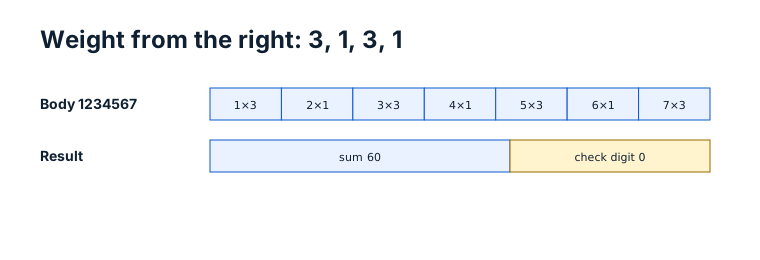
Weights alternate from the rightmost body digit
Original workflow aid
Worked weighting trace
This trace makes the right-to-left starting point visible. The products total 60, so the appended check digit is 0.
TEST / SYNTHETIC / NOT FOR COMMERCIAL USE. This short body demonstrates arithmetic only and is not an issued identifier.
Related local tool
Continue with the working tool
Calculate a check digitSource record
- GS1 General Specifications, GS1. Version or revision: 26.0.0. Reviewed .