Guide
SSCC and GLN check digits without mixing the key types
Apply the shared GS1 Modulo-10 method while keeping logistic-unit and location identifiers in their separate business contexts.
On this page
Direct answer
SSCC and GLN use the same GS1 Modulo-10 check-digit calculation as GTIN, but they identify different things and have different lengths. An SSCC is 18 digits and identifies a logistic unit. A GLN is 13 digits and identifies a location or party according to GS1 allocation rules. Matching arithmetic does not make the key types interchangeable.
For an SSCC body, calculate over 17 digits and append the eighteenth. For a GLN body, calculate over 12 digits and append the thirteenth. Preserve the body as text and select the intended key type before running the formula.
Why context comes before calculation
An SSCC is designed for a logistic unit such as a pallet or case assembled for transport or storage. Its structure includes an extension digit, a GS1 Company Prefix and a serial reference before the final check digit. The allocation and uniqueness process belongs to the responsible organization; a calculator does not create that process.
A GLN identifies a physical location, digital location, legal entity, function or another location/party context defined by GS1 rules. A 13-digit GLN can resemble a GTIN-13 at the character level. The shared length and check-digit pattern are not enough to decide whether a value is a location key or a trade-item key.
The operator must obtain context from the source field, message specification, label or business process. A tool should not announce one interpretation as certain when multiple supported key types fit the same string.
Worked example
Imagine a warehouse export with columns named logistic_unit_id and ship_from_location. The first column is documented as SSCC and should contain 18-character strings. The second is documented as GLN and should contain 13-character strings. Validate each column against its declared type instead of scanning every numeric field.
If an 18-character entry has a mismatched final digit, compare all 18 characters with the source label or system. Do not calculate a new final digit and overwrite the record automatically. A body character may have been copied incorrectly, and replacing only the last character would create a different structurally consistent key.
TEST / SYNTHETIC / NOT FOR COMMERCIAL USE. Field names and arithmetic scenarios here are examples, not allocated SSCCs or GLNs.
Using Application Identifiers
In a GS1 element string, AI 00 designates an SSCC. A GLN can appear with different Application Identifiers depending on its role; for example, specific AIs distinguish location-reference purposes. Parentheses are used in human-readable notation but are not normally encoded as data characters in the carrier.
Parsing the AI answers a syntax question: which data definition is declared in that element string? It still does not query a registry or confirm that the following key was allocated to the organization using it. Carrier rules, separators and field validation are additional layers beyond the bare key’s check digit.
Common mistakes
- Treating every 13-digit key as a GTIN-13 because the length matches.
- Treating every 18-digit numeric string as an SSCC without field context.
- Including the AI characters in the key’s own check-digit calculation.
- Dropping an SSCC extension digit or a leading zero in spreadsheet software.
- Reusing one SSCC for multiple logistic units contrary to the organization’s allocation process.
- Assuming a GLN check proves a physical address or legal entity identity.
- Describing structural success as registry verification.
Limits and what is not checked
BarcodeOpsKit checks supported length, character and check-digit structure locally. It does not allocate a serial reference, enforce organizational uniqueness, validate a GS1 licence, verify a company prefix, locate a facility, confirm a legal entity, or establish ownership.
It also does not prove that an SSCC or GLN is correctly used in an EDI message, label, GS1-128 symbol or GS1 Digital Link. Those workflows have additional syntax, application and trading-partner requirements. Physical print quality remains outside a digit calculation.
Use the related tool
Use the check digit calculator and explicitly select GLN-13 or SSCC-18. The tool shows every right-to-left weight and product. Use the GS1 Application Identifier parser when the key appears inside a larger element string.
Sources and review
This guide was reviewed on 2026-07-13 against GS1 General Specifications 26.0.0 and the GS1 Identification Keys reference card. The source record supports structure and terminology only. BarcodeOpsKit is not affiliated with GS1 and does not perform an allocation lookup.
Related guides
Review How GS1 check digits work for the formula and GS1 Application Identifiers for the identifiers that declare SSCC and GLN data inside element strings.
SSCC and GLN share arithmetic, not length
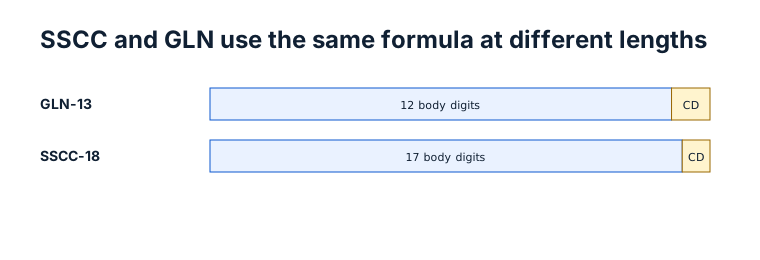
Original workflow aid
Keep key type and arithmetic together
SSCC and GLN share the Modulo-10 method, but length and business context determine which validation mode is appropriate.
Related local tool
Continue with the working tool
Calculate an SSCC or GLN check digitSource record
- GS1 General Specifications, GS1. Version or revision: 26.0.0. Reviewed .
- GS1 Identification Keys reference card, GS1. Version or revision: Reviewed 2026-07-13. Reviewed .