Guide
FNC1 separators explained for GS1 element strings
Learn when variable-length fields need a separator, why scanner output often contains ASCII 29 and why a parser must not guess.
On this page
Direct answer
FNC1 has carrier-specific roles in GS1 barcode processing. One important role is separating a variable-length element string from the AI that follows it. Scanner interfaces commonly transmit that separator as the group-separator control character, ASCII 29. Fixed-length fields do not need a separator merely because another field follows.
If a variable field is last, no trailing separator is needed. If another element follows and the variable field ended before its maximum length, the boundary must be represented unambiguously. A parser should report missing-separator ambiguity rather than guess.
Start markers and field separators
The same term appears in two related contexts. GS1-aware carriers use an FNC1 mechanism in a required starting position or mode so scanners can distinguish GS1 data processing from ordinary payload text. Within concatenated element strings, FNC1 can also mark the end of variable-length data.
The encoded symbol does not necessarily contain the literal text {GS} or the visible characters FNC1. Those are display conventions used by software and documentation. A scanner commonly sends ASCII 29 between fields. BarcodeOpsKit accepts explicit representations such as {GS} or a caret convention only as documented input forms, then shows normalized output separately.
Do not globally remove control characters before parsing. Doing so can merge two fields and destroy the evidence needed to locate the boundary.
Worked example
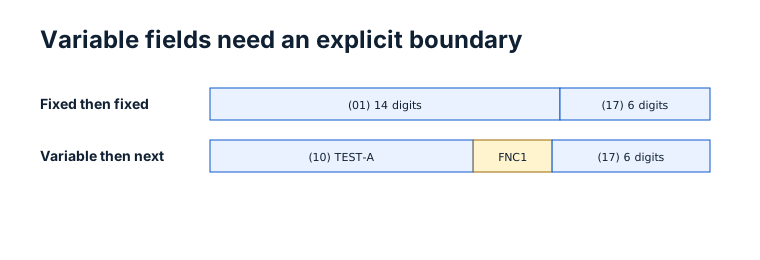
Imagine an element string with a fixed-length GTIN field followed by a variable batch field. The parser knows exactly where the GTIN ends because its definition is fixed. If the batch is last, the input can end after the batch value without another separator.
Now place an expiration-date element after the batch. The batch is variable, so the scanner form needs a separator between the batch value and the next AI. If it is absent, a sequence near the end may look like the expiration-date AI, or it may simply be characters belonging to the batch. Both readings are possible from the text alone.
TEST / SYNTHETIC / NOT FOR COMMERCIAL USE. This boundary example does not describe a real lot, date or trade item.
Why guessing is dangerous
A guess can create fields that look individually valid. A suffix might have the right number of date digits, and the preceding text might fit the batch maximum. That does not prove the source intended that split. Silent guessing can change traceability data, expiry interpretation or downstream routing.
Conservative software returns a stable ambiguity error and tells the operator how to recover: provide bracketed notation from an authoritative source, retain ASCII 29 from the scanner, or regenerate the carrier with the correct separator. The original input must remain visible so the correction is reviewable.
Scanner setup matters as much as parser code. Keyboard-wedge profiles, serial interfaces and application frameworks can transform control characters. Test how the selected scanner exposes ASCII 29 and document the configuration expected by the receiving application.
Common mistakes
- Typing the letters
FNC1into the data and expecting a control function. - Removing ASCII 29 during input sanitization.
- Adding separators after every fixed-length field without understanding the carrier rule.
- Forgetting a separator when variable data is followed by another element.
- Requiring a trailing separator after the last variable field.
- Guessing a split because a suffix resembles a known AI.
- Assuming a parser success proves the physical symbol used the correct start mode.
Limits and what is not checked
BarcodeOpsKit reports supported separator and field-boundary evidence from the supplied string. It cannot reconstruct a separator that upstream software removed with certainty. It does not inspect scanner firmware settings, certify carrier conformance, verify batch truth, establish product ownership or grade a printed symbol.
A browser image decode may report characters differently from a hardware scanner profile. Integration testing should include the real scanner, interface, application and expected downstream message format.
Use the related tool
Use the GS1 Application Identifier parser to compare bracketed notation with scanner form, inspect which fields are fixed or variable and see explicit separator status. The tool preserves ambiguity and never opens a decoded URL automatically.
Sources and review
This guide was reviewed on 2026-07-13 against GS1 General Specifications 26.0.0 and GS1 DataMatrix Guideline 2.5.1. It records the distinction between encoded carrier functions and transmitted group separators without claiming physical conformance. BarcodeOpsKit is not GS1 affiliated.
Related guides
Read GS1 Application Identifiers for field definitions and Code 128 vs GS1-128 for why generic carrier data and GS1 processing are not interchangeable.
Field length determines the FNC1 boundary
Original workflow aid
Separator decision worksheet
The boundary decision depends on field length and position, not on whether the next digits happen to resemble an AI.
Related local tool
Continue with the working tool
Inspect separators in a GS1 element stringSource record
- GS1 General Specifications, GS1. Version or revision: 26.0.0. Reviewed .
- GS1 DataMatrix Guideline, GS1. Version or revision: 2.5.1. Reviewed .