Guide
GTIN vs UPC vs EAN: what the names actually mean
Learn why GTIN names an identification key while UPC and EAN usually describe familiar barcode and numbering contexts.
On this page
Direct answer
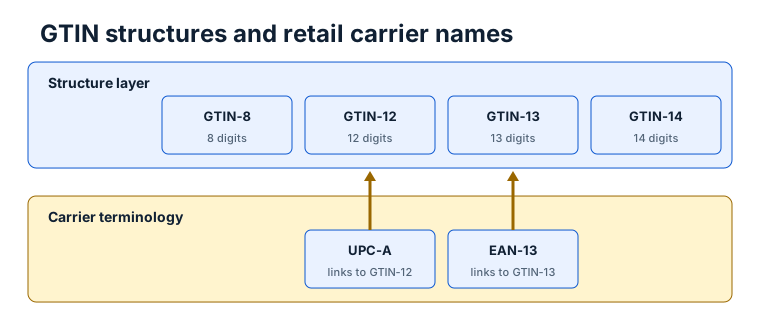
GTIN is the broad identification-key name. UPC and EAN are older, widely used names that often refer to particular GTIN lengths or to the barcode symbols that carry those numbers. A 12-digit number commonly called a UPC is a GTIN-12. A 13-digit number commonly called an EAN is a GTIN-13. The number and the printed bars are related, but they are not the same object.
That distinction matters when a form asks for a “UPC,” an “EAN,” or a “GTIN.” First check the required length and business context. Do not add or remove a leading zero just to make a field accept the value unless the receiving system documents that representation. Keep identifiers as text so leading zeros survive.
Three layers that are easy to mix up
The first layer is the identifier. A GTIN identifies a trade item according to GS1 rules. The initial release of BarcodeOpsKit recognizes GTIN-8, GTIN-12, GTIN-13 and GTIN-14. Each one is a fixed-length numeric string with a final check digit.
The second layer is the data carrier. UPC-A and EAN-13 are linear barcode symbologies used to represent familiar retail GTIN forms. Other carriers can also encode GTIN data, including ITF-14, GS1-128, GS1 DataMatrix and QR Code with GS1 Digital Link syntax when the applicable standard and application allow them.
The third layer is the business record. A retailer, marketplace, registry or trading partner may associate an identifier with a product and may impose additional acceptance rules. Reading the bars or validating the number does not query that record.
Worked example
Suppose an operator receives a 12-character numeric string ending in a matching check digit. BarcodeOpsKit can classify it as a possible GTIN-12 and can show the weighted check-digit evidence. In everyday retail language, a colleague may call the same value a UPC. If the value is rendered with UPC-A, the bars are a UPC-A carrier of that GTIN-12.
Now imagine a receiving system requests 14 characters. It may expect a GTIN represented in a 14-digit database field, sometimes with leading zero padding for shorter GTIN forms. That storage representation does not silently turn every source number into a newly assigned GTIN-14. Follow the interface specification and preserve the original value separately.
TEST / SYNTHETIC / NOT FOR COMMERCIAL USE. This example explains terminology only and does not provide an issued identifier.
Why leading zeros matter
Identifiers are strings, not quantities. Numeric spreadsheet cells, JSON numbers and database integer columns can remove a leading zero. Once removed, the value can appear to change from one length class to another. It may also produce a different check-digit calculation if someone tries to repair it after the fact.
Import and export the value as text. In a spreadsheet, use a text column or an import workflow that preserves characters exactly. In code, avoid converting the identifier with Number, parseInt or a numeric database type. Display normalization separately from the original input rather than silently changing the source.
Common mistakes
- Treating “barcode” as a synonym for the identifier. A barcode is a machine-readable representation; the identifier is data.
- Assuming every 12-digit string is an assigned UPC. Length recognition and a matching check digit are only structural evidence.
- Calling any 13-digit value an EAN without checking characters and the final digit.
- Removing a leading zero because a spreadsheet hides it.
- Expecting a GTIN check to identify the product, company or owner.
- Assuming a renderer proves that the physical print will scan at retail.
Limits and what is not checked
BarcodeOpsKit checks local structure: allowed characters, supported lengths and the GS1 Modulo-10 check digit. It does not issue GTINs, search GS1 registries, verify a company prefix, prove ownership, identify a product or determine whether a marketplace accepts the number.
A rendered image and a successful digital self-scan show that a software decoder could read the generated pixels. They do not certify quiet zones, dimensions, contrast, substrate, printer behavior or scanner performance on a physical package.
Use the related tool
Open the GTIN, UPC and EAN validator when you need to inspect a complete value. It preserves the original string, lists possible interpretations when a supported length is ambiguous, and separates the expected digit from the entered digit. Use the check digit calculator when you have only the body and need to calculate the final digit.
Sources and review
This guide was reviewed on 2026-07-13 against GS1 General Specifications 26.0.0 and the GS1 support explanation of GTINs and barcodes. The source record above identifies the publisher, version or review marker and URL. BarcodeOpsKit is independent and is not affiliated with or endorsed by GS1.
Related guides
Continue with GTIN-8, GTIN-12, GTIN-13 and GTIN-14 explained for length-specific use, then read Check digit valid vs registered before interpreting a passing result.
Identifier and carrier names occupy different layers
Original workflow aid
Name the layer before validating it
Many disagreements disappear once the identifier, barcode carrier and business record are discussed as different objects.
Related local tool
Continue with the working tool
Validate a GTIN, UPC or EAN valueSource record
- GS1 General Specifications, GS1. Version or revision: 26.0.0. Reviewed .
- How do GS1 GTINs and barcodes work?, GS1. Version or revision: Reviewed 2026-07-13. Reviewed .