A numeric retail symbol
A decoded 012345000058 keeps its leading zero and receives local length and check-digit evidence.
Local browser tool
Explicitly start a camera or choose an image, decode one symbol locally, and inspect the text without automatically opening decoded URLs.
Local camera and image decoding
Frames and images stay in this browser. Camera permission is requested only after the Start camera button.
Scanner state
Camera access begins only after you press Start camera. You can choose an image without camera permission.
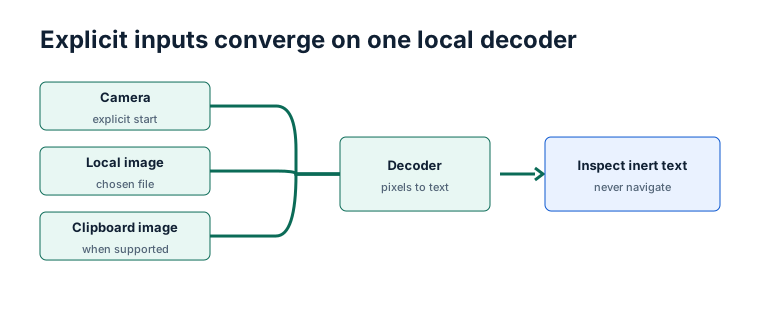
Use the camera when the symbol is on a package or screen that you can move while watching the viewport. Choose a local image when you need a stable attempt that can be cropped or retaken before decoding. Use the clipboard-image action only for an explicit screenshot workflow in a browser that exposes the required API and permission.
| Input | Best use | Common failure | Cleanup |
|---|---|---|---|
| Camera | Repositioning a physical symbol in real time | Permission, motion, glare, or another app using the camera | Stop tracks after success, Stop camera, route change, pagehide, or unmount |
| Local image | Stable evidence from an existing photo | Cropped quiet zone, downscaling, blur, or multiple symbols | Revoke object URLs and release decoded image state |
| Clipboard image | A supported browser's explicit screenshot workflow | Clipboard API unavailable, no image item, or permission refusal | Release the temporary image object after the attempt |
Clipboard availability is capability-detected and never assumed. All three paths converge on local decoding, but they have different recovery options: reposition a live camera, replace a file with a cleaner crop, or repeat a supported clipboard read. None of the paths uploads the pixels or preserves a result automatically.
Camera access starts only after a button press. The scanner prefers the browser's native BarcodeDetector when it reports supported formats and dynamically loads a maintained ZXing browser fallback otherwise. Image files follow the same local path; compatible browsers also expose an explicit clipboard-image action.
One decoded result is shown as selectable text with its symbology. A numeric value is passed directly to the existing in-memory structural validator, never through a query string or cross-route store.
Begin with framing. A barcode needs clear space around its outer bars or modules so a decoder can find the symbol boundary. A crop that removes this quiet zone may look tidy to a person while hiding that boundary from software. Keep the complete symbol in view, leave space on every side, and remove unrelated labels from the frame. If two symbols remain visible, crop or reposition until only the intended candidate is present; the scanner does not choose between multiple results.
Next distinguish motion blur from focus. Motion stretches edges in one direction, so steady the camera or package and try again. Poor focus softens edges in every direction, so increase distance slightly and allow the lens time to settle. Glare can erase dark modules, while a dim or low-contrast image can merge light and dark areas. Change the light angle instead of pointing a bright reflection directly at glossy packaging.
Then inspect image scale and shape. Downscaling, messaging-app compression, or a low-resolution screenshot can reduce narrow modules to fractions of a pixel. Enlarging that damaged file does not restore the lost pattern; return to the original image or take a closer photo. A strongly tilted camera also turns a rectangular grid into a skewed quadrilateral. Hold the lens more parallel to the symbol, while keeping enough distance for sharp focus and a complete quiet zone.
Diagnose in that order: isolate one complete symbol, steady and focus it, move the light, then retry with an original-resolution image and a straighter angle. A successful read completes pixel decoding only. Identifier or GS1 syntax validation is a separate evidence layer, and physical print verification requires suitable measurement equipment and procedures outside this browser. A scanned URL stays inert text; success never creates a link or triggers automatic navigation.
Decoding proves only that a local decoder read pixels. It does not prove that a number was issued, that a company owns it, that a product exists, that GS1 Application Identifiers are semantically correct, or that a physical print meets verification grades. Decoded URLs are inert text and are never opened automatically.
A decoded 012345000058 keeps its leading zero and receives local length and check-digit evidence.
https://example.invalid/TEST-01 is displayed as text. The scanner does not create a link or navigate.
When native detection reports multiple candidates, the scanner asks you to crop or reposition rather than guessing which value to use.
TEST / SYNTHETIC / NOT FOR COMMERCIAL USE. Examples do not identify real products or organizations.
Frames, image bytes, filenames, and decoded values are not uploaded, logged, analyzed, persisted, or added to URLs. Stop camera, a successful one-shot scan, page navigation, pagehide, and component cleanup release decoder controls, media tracks, video sources, and object URLs.
Browser integration reviewed 2026-07-13 against the Barcode Detection API capability model and @zxing/browser 0.2.1. Identifier evidence uses GS1 General Specifications 26.0.0. BarcodeOpsKit is independent and not affiliated with GS1 or ZXing.
Generate and self-scan a barcode,inspect identifier evidence, or validate a local batch. Read theGS1 DataMatrix and QR Code comparison when carrier meaning matters.